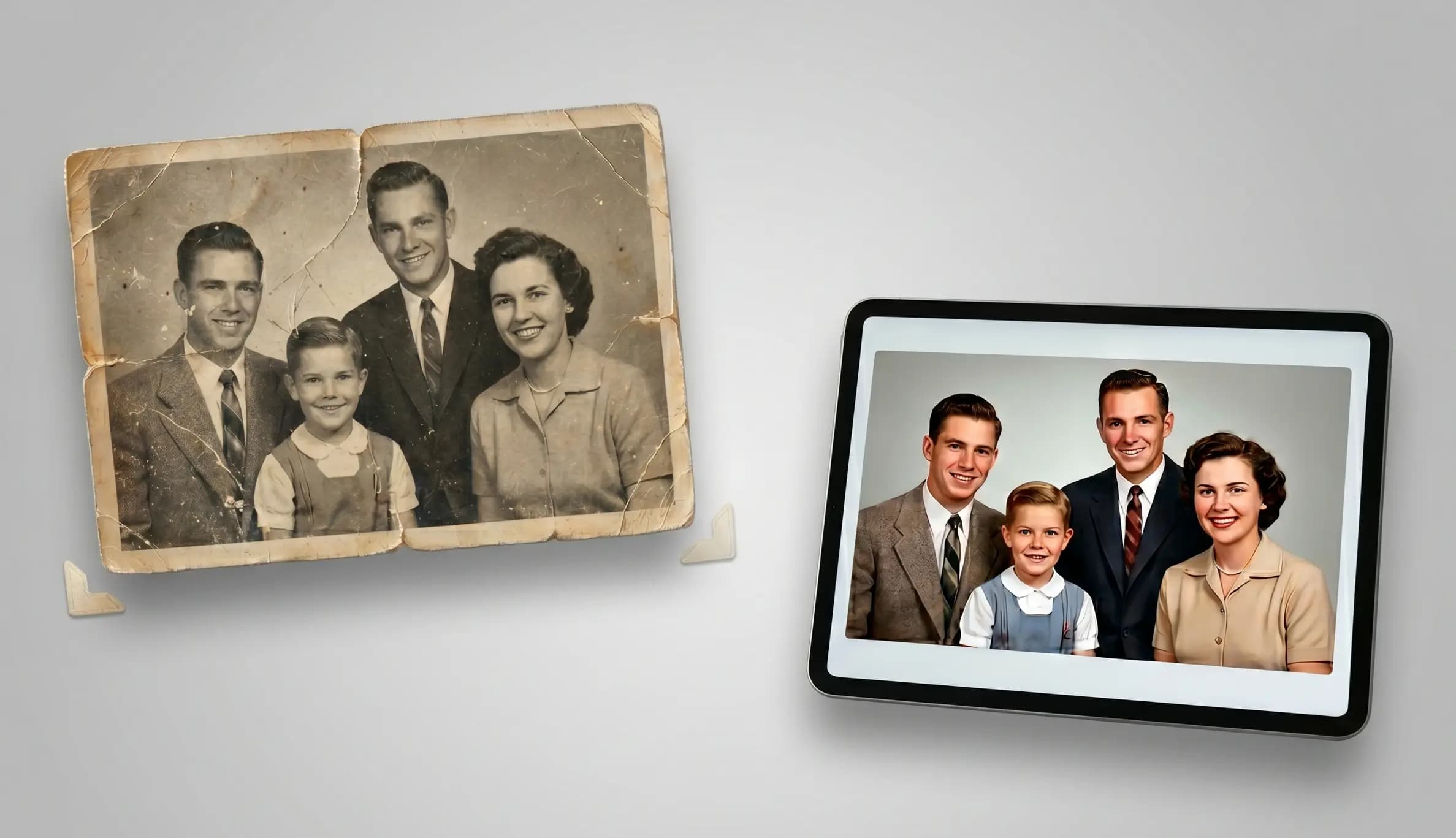
How to Restore Old Photos with AI
By Batuhan Balcı - Co-Founder
Have those old family photos been gathering dust in a folder, slowly fading away? It’s a shame to let those memories blur, but the good news is you can bring them back to life in just a few minutes with AI. In this post, I’ll walk you through the easiest ways to use AI tools to sharpen, clear up, and restore your vintage photos, so your favorite moments look as crisp as the day they were taken.
Giving Your Old Photos a Second Chance
We’ve all got that one drawer or a dusty folder on our phone full of photos that honestly, just don’t look great anymore. They’re blurry, faded, or maybe they’ve been scratched up over the years. It’s kind of a bummer, right? You look at them and think, 'I wish I could actually see what’s going on here.
Well, here’s the good news: you don't have to just live with those grainy memories. AI has gotten so smart lately that it can basically act like a time machine for your photos. You can take those old, beat up pictures and actually bring them back to life in a way that feels real again. And it’s not just about making them look 'clear' if you’re into creative stuff, you can even use modern AI video and image apps like Moviegen AI to turn those static, old school shots into something completely new. Trust me, it’s a lot easier than it sounds. Let’s dive into how you can fix up your favorites and get them looking fresh.
It's All About the Prompt
So, how do you actually tell the AI what to do? It really comes down to the prompt. You don’t need to be a pro at this; you just need to use the right words. I like to focus on simple instructions like 'sharpening details,' 'cleaning up the face,' and 'making the lighting natural.' Different AI models work better for different things, so it’s worth trying a few to see which one handles your photo best. I’ve spent a lot of time testing these out, and I finally landed on a specific prompt that just works.
If you found this guide useful, make sure to explore our other AI content creation blogs as well. And if you want to access multiple advanced AI models from a single platform, don’t forget to try Moviegen AI.
Prompt:
Conduct a professional, ultra high resolution restoration and upscaling process on the provided reference image. Seamlessly eliminate all physical damage, including tears, creases, dust spots, water stains, and scratches, making the photo surface clean and smooth. Retain the exact composition, pose, and all unique features of the subject without modification, but clarify them meticulously. Utilize advanced AI enhancement to reconstruct all blurred areas and facial features with high fidelity and realistic, crystal clear detail, simulating a capture from a modern (2026 era) high megapixel professional studio camera. Render fine textures like skin pores, individual hair strands, and clothing fabric weaves (e.g., tweed or silk) with extreme sharpness. Restore the original lighting to a clean, balanced professional quality. Maintain the original background essence but with sharper definition and natural depth of field. The final output must be a clean, square bordered photograph with zero defects and maximum detail.
Join us on